
Guide
FACEIT level badges: styles, extended levels and where they appear
Where the extension’s level badges appear, the badge styles you can pick, and how they relate to FACEIT’s own level icons.

FACEIT’s badges and the extension’s
FACEIT Extender keeps FACEIT's own badges for levels 1 to 9 and adds its own artwork for levels 11 to 20, with New, Legacy and Pepe styles to choose from.
FACEIT shows a level badge from 1 to 10 next to every player. FACEIT Extender keeps those badges for levels 1 to 9 and adds its own artwork once a player reaches level 10, including the extended levels 11 to 20 that FACEIT does not have.
Extended levels are calculated from the player’s current Elo in bands of 235 Elo starting at 2,151, with level 15 starting at 3,001. The Elo and levels guide has the full table.
Where the badges appear
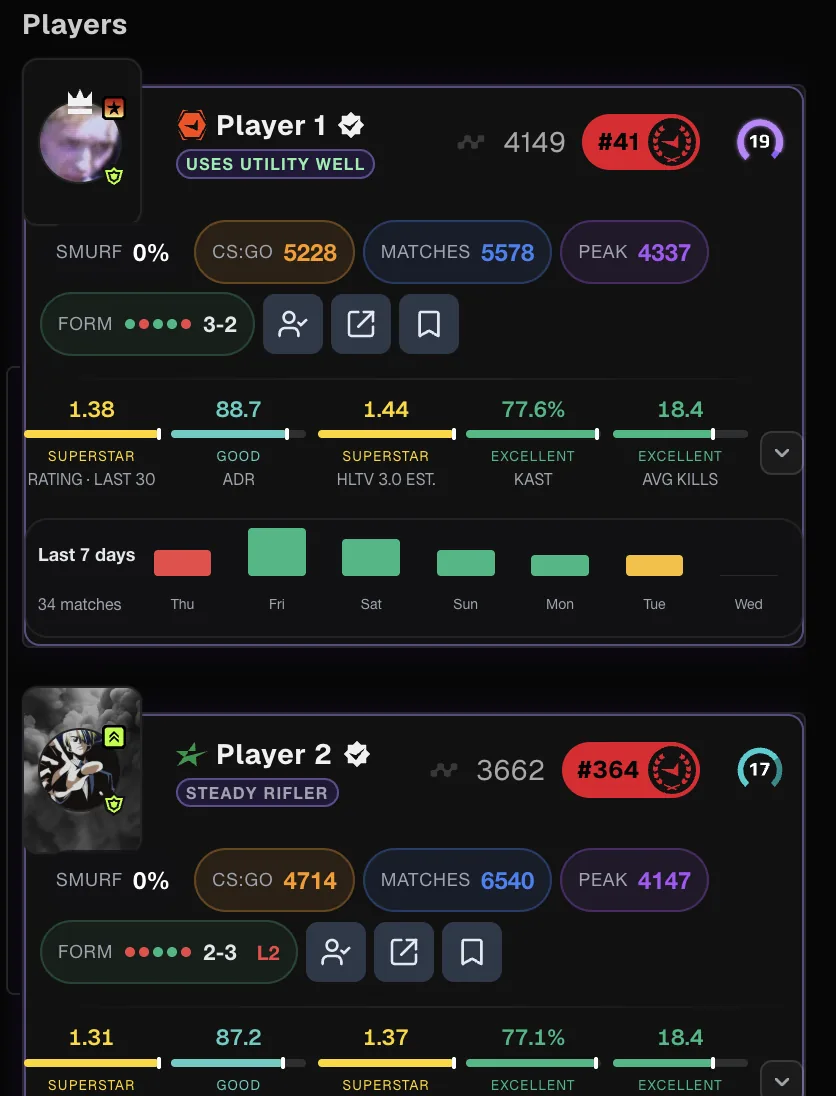
- Match room player cards and the team summary at the top of the match room.
- Player lobby cards.
- Player profiles.
- Matchmaking party cards, so you can see where your party members sit above level 10.
- Tables such as the extended match history, where a small badge sits before each Elo value.
- The floating panel and sidebar dock that show your own level and Elo.
On party cards the extension reads the Elo printed on the card. FACEIT’s own icon is hidden while the extended badge is shown and comes back when the extended level no longer applies, for example when a different player takes that slot.
Badge styles
There are several collections to choose from in the Appearance tab of the popup:
| Style | What it looks like |
|---|---|
| New | The current extension artwork for levels 10 to 20. |
| Legacy | The earlier extension artwork, for players who prefer the original look. |
| Pepe | Pepe frogs for every level from 1 to 20, including FACEIT’s own levels. |
You can compare the new and legacy badges side by side in the levels section of the features page. The appearance options also include colour schemes and a meme language for the whole interface.
Reading a lobby with extended badges
In a high-level lobby, FACEIT shows ten identical level 10 badges. With extended levels, the same lobby might show a level 12 next to a level 17, which tells you at a glance that the gap between those two players is more than 1,000 Elo.
The team summary at the top of the match room uses the same scale for the team’s average Elo, so you can compare the two sides before reading any individual card. A badge is still a summary: two players in the same band can be 234 Elo apart, so check the Elo itself when it matters.
Turning badges off
Extended levels have their own switch in the Appearance tab, and every preset from Minimal upwards turns it on. If you would rather see only FACEIT’s badges, switch it off. Players above 2,000 Elo then show FACEIT’s level 10 again, and the rest of the extension keeps working.
Badges are only visible to people who use the extension. Other players in your match see FACEIT’s normal icons.
Get the badges
Install FACEIT Extender for Chrome or Firefox and pick a preset, or switch on extended levels in the Appearance tab. Badges show up the next time you open a FACEIT page; refresh any FACEIT tab that was already open, as the getting started steps explain.
To change the badge style, accent colour and language, see change language, colours and level icons.
Related guides
FACEIT Extender is free for Chrome and Firefox: download it or read what it is and does.
Comments
Comments load in your browser.